Saturday, July 14, 2012

I use a computer, but I'm still a human


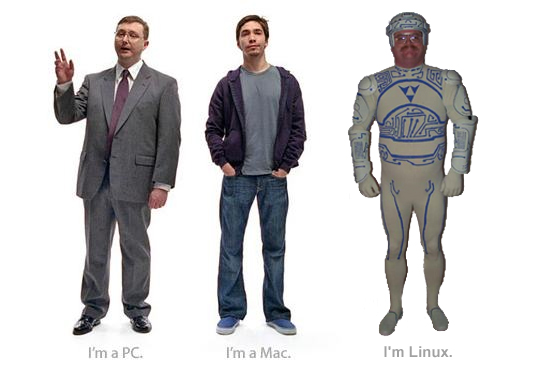
Thankfully, the insidious rivalry commercials produced by Mac and PC camps that depicted people claiming either "I'm a Mac" or "I'm a PC" have all but vanished probably since the introduction of Intel-based Macs in 2006 blurs the distinction. I always found the notion that we are what we compute with irksome. Perhaps we humans have gotten lost in the notion that all of our productive power must be augmented by computers and technology. But, personally, I'm uncomfortable with my ever-shrinking capacity to remember phone numbers and appointments without reminders from my phone or email interface.

My first computer was built to play games on it, and it didn't come with an OS; I had to install Qbasic just to get limited functionality. Even then, I had to learn how to make the thing do what I want, which was basically running command lines in DOS to find and run executables. I grew out of any need to play video games on my thousand-dollar 486 pretty quickly because going outside was still a prettier and more immediately-gratifying option that staring at a 24 dot pitch monitor running 8-bit graphics.

Eventually, I was so heavily involved in music, I barely touched the keyboard. Instead I got lost in making music with friends as loud as possible without police intervention, and this was enough. In fact this was plenty and exciting, and practice made for hours of socialization and camaraderie - if not perfect.
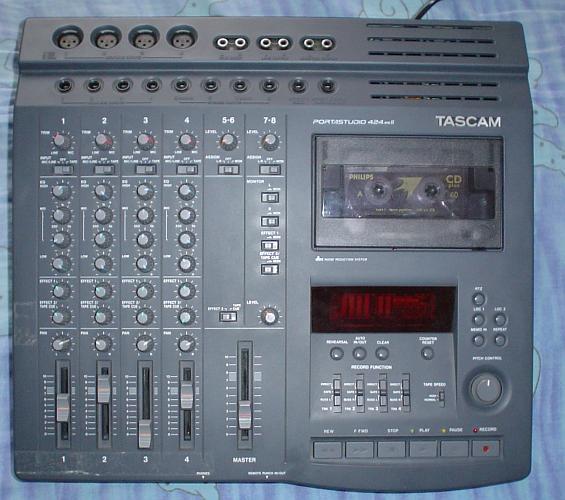
But after the birth of my first son, I had a lot less time for practice, and I needed to find a way to continue making music with limited time to do it. So I invested in my first recording device, a used Tascam 424MKII which allowed me to layer tracks as time permitted. Eventually, I grew out of this, and needed more tracks and processing power without a ton of expensive outboard gear.

Hello again, computer!

If you use a PC in your recording environment, surely you've come across Mac users who question your intelligence. I've heard a ton of remarks that imply that there is no way to be a professional recording engineer and use a PC because Macs don't hiccup, work perfectly, are more intuitive, never get viruses, have excellent compatibility with high-end gear, etc. I'm sure that pc-using graphic designers have heard the same things. That being said, when these folks brought in their Macs to my studio there would be hiccups in performance - nothing major, but very similar to my own experience with my PC setup. Therefore, I was never particularly motivated to make such an expensive investment.
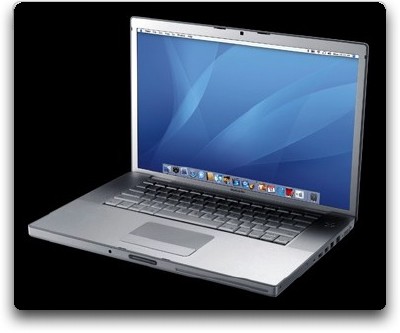
Later down the line, I got a job in IT (on account of my studio work, mind you) and I was issued a brand new Mac laptop. It was the non-unibody 2007 15" Macbook Pro. Macs have always carried with them a notion of limitation - harder to program, impossible to reconfigure, small software catalog. Where was the freedom to tinker like one has with a PC?  - For those of you jumping up and down with arguments against this characterization, I admit I was wrong. This machine was elegant - really really elegant. It felt nice to type on, it was the smoothest operating machine I had ever used, and it ran like a dream. The Intel-based chipset provided an ever-expanding catalog of software and the introduction of Open Source software introduced many free downloads that opened up the OSX system to deeper personalization (such as TinkerTool). Because it was a laptop, it didn't have the expandability of a desktop for PCI upgrades and such, but the DAW market expansion into USB interface equipment and Mac's legendary compatibility with MIDI devices in programs as basic as Garageband made that point moot. The only real limitation was my wallet.

However, catastrophic failures of machinery are no respecter of brand, and this machine, after three years of heavy use, died due to the infamous Nvidia graphics chip failure. I received a used Unibody Macbook as replacement through my job, and it was a dreadful machine. It was slower than the Macbook Pro, despite a faster processor, the glossy screen made it almost impossible to see what I was doing in nearly any lighting situation, the keyboard felt far less satisfying, and the "hidden" trackpad button made such an annoying sound EVERY time I pushed it. I hated it. The previous owner hadn't abused it, but had put it through it's paces, so I had to break it down to do some maintenance and cleaning. The construction, in my opinion wasn't nearly as well thought out, either. One particular headache with the unibody was the power management system which resulted in false battery readings and periodic shutoffs in the middle of work - inexcusable and frustrating to say the least. I will say however, that the ability to remove the battery cover to access the hard drive was a very nice design, but this sacrificed the ease of accessing the RAM - probably due to increased RAM capacity in the models when they shipped versus ever-increasing HDD demands and reduced storage costs. In recording environments, it stuttered and spurted and exhibited all sorts of weirdness that made me lament the death of my first machine. But if I wanted to repair the Macbook Pro, replacement parts, and, go forbid, apple store servicing carried astronomical costs. In addition, replacement Macbook Pro models from the same year remained cost prohibitive, and carried the same graphics chip risk, so I was stuck with this junk.

I want to take a time-out to comment that paying over $1000 for a laptop should carry with it some golden protection plan that if your machine dies for any fault of manufacture it will be fixed or replaced, because it is absurd that such an investment comes with such risk. Apple's answer was a recall that protected the machines that were within the original warranty. Ideally, expensive devices like this work like they are supposed to and don't have major flaws in design - that's why a person pays so much more than a lower-cost model.  My better half has an HP laptop that she paid nearly the same price for as a comparable Macbook and it has worked flawlessly for six or seven years. My $1000 Fujitsu tablet issued by the same job had no issues after 5 years of heavy use and, to my knowledge, is still going strong. Also, when a PC desktop (perhaps a Mac-based tower as well) suffers a catastrophe, any of the internal components can be replaced or upgraded for a very manageable cost, and you're up and running as long as you were performing regular backups.

When it worked, the 2007 Macbook Pro was a brilliant machine that was extremely well engineered, extremely predictable in function, and beautiful in ergonomics - but it broke. So, in the familiar words of the band Fugazi's Merchandise, my contribution to the Mac vs PC debate is this: "You are not what you own." Instead, both Macs and PCs are machines that present a mirror of their makers, an elegantly made, yet flawed, piece of circuitry.

Monday, June 25, 2012

the sound of monitors

Years ago, I decided to invest in some good monitors because I had always heard the sage advice that the two most important things you could buy for recording were good mics and great monitors. Well, everything is crucial when recording, pretty much, but I accepted this sage advice and invested in Mackie HR624 MKIs. This is a 6.7" woofer reference monitor with a relatively small footprint. They had been lauded all over the internet as industry standards in the $400(each) price range. I took the plunge. But I also was eyeballing some 6.5" woofer YSM1Ps released by Canada's Yorkville Sound company (who formerly made the noteworthy Traynor tube bass amp line in the 70s).


Both speakers had similar specs (Mackie, Yorkville), but there were a handful of important differences. First, the Mackies were really well known and released by a reputable company, whereas the Yorkvilles were basically unrepresented online. The Mackies' smaller size was also attractive given they'd be in a confined space. Lastly, however, the Yorkville price was much more favorable. Mackies were selling in the $600USD range whereas the YSMs were selling for under $300 for the pair. So I did what any idiot with a limited budget does. I bought them both with the intention to sell the losers. It didn't go down like that, though.

Design

Both  sets are Bi-amped Tweeter/woofer 2 way systems. The Mackie features 100w woofer/ 40w tweeter (presumably peak) and the YSM1p is 85/30w peak. I'd say, however, that power ratings are usually not useful for these kinds of speakers because no one wants to hear these things blaring for several hours at a time. And if you ever did need to crank them, I doubt 15 watts are going to matter. Both are made with particle-board enclosures. The 624s have a classy wood-grain veneer and the YSMs have the cheaper-looking, but durable, textured stuff similar to what is found on amp heads. The latter looks cheaper, but is actually more scratch resistant, if that matters to you. As mentioned, the YSM is a good bit taller and wider, accommodating the bass-reflex hole that the 624s lack. Both feature calibration options to tailor to room applications (624s are easier to adjust, and include low-mid-high, whereas the YSMs are just low-mid). Features only on the Mackies, that I just love, are first the auto-on standby feature so that you don't have to touch the power buttons, and second the multiple input options. The former works wonderfully. Speakers kick on when sound is produced in about the time it takes to blink, and they auto shutoff after about 5-10min of silence. This is invaluable when you wish to place them out of convenient reach. I will say, that one of mine tends to power down about 15-30 seconds later, though. The addition of independent XLR, 1/4" and RCA inputs also diversifies its usefulness. Want to add these to your home theater? There's an input for that. The YSM are just dumb old rocker switches and the combo-input xlr-1/4" type.

Sound

Mackie: To my ears, the THX certified Mackies were more detailed and had a more limited, focused stereo field which could be advantageous in stereo-critical mixing situations in tight control spaces, useful in less than perfect listening rooms if your head stayed in the right spot. I was bothered by a seeming boost in the low-mids that made the bass sound muddy. The punchy tight low end was still there, but hard to discern due to the increased midrange. I also had a really hard time hearing reverb that had been added to the material, and often found this way too pronounced when I left the mixing room. In fact, mixes never sounded like I had intended, which is an engineer's nightmare. I admit, that my listening space was all wrong, but I also think that a balance should have been struck given this small near-field monitor is ideally suited for home recording and small-budget studios where the appropriate sound environment is next to impossible.

Yorkville: The YSMs, on the other hand, had less of a reference feel to them. They were airy and very listenable, which concerned me at first. Ideally, monitors are exact reproductions of the listening material. This coloration could be a problem when trying to mix. However, I discovered that when I mixed on them, they produced mixes that closely resembled what I heard on other stereos. This reminds me of stories how famous engineers said that they do all of their studio listening on home stereos because that's where the music ends up anyway. All material tends to sound good on the YSMs, for better or worse. But when polishing a mix or mastering tracks, these are tight enough to expose the difference between great sounding and bad sounding material.

Longevity

I bought both sets of speakers used at the same time going on 8 years ago, now. I've had no major issues with either set, which is saying something because I have been using both extensively ever since, and they have been moved a few times. As I mentioned, the Mackies have a tendency to show more wear, and both have minor chips on the edges from moving. The power button on one of the HR624s has been quirky, and may require patience getting it to actually power on/off, but if you use the auto feature, this doesn't matter. Soon after I bought the YSMs, some fiberglass insulation inside started to droop down, and was visible through the bass reflex port. I took the whole thing apart and taped it back up, and never saw it again. They do show a little dust in the ports which may be from the movement of this seemingly cheap choice of material. Also, someone once barely touched the flexible cover over one of the tweeters on a YSM, which popped it in and caused wrinkles rather easily - I had to gently coax it back out to its original shape. The HR624s have metal grills that cover the tweeters, so that is not an issue. All in all, both have aged extremely well, which speaks to the Yorkvilles more than Mackie by virtue of their much cheaper price.

Bottom Line

Both of these monitors are outstanding and worth a look on the used market. If I was talking to a fellow hobbyist, I'd have no problem recommending the much cheaper Yorkvilles. They sound great, are way cheaper and last a good long time to get your money's worth. To my ears, the Mackies are best applied as a supplement in a multi-montor setup or at least with properly tuned acoustics. I'll bet someone out there will swear by them because they are truly rock-solid. But for me, I found them limited and rather frustrating to mix on due to the low-mid boost. Worth noting: I did use these for home theater listening for a brief stint and they were fantastic, but the tight stereo field did create issues. For example, turning your head makes a big difference, and not setting in dead center made the stereo pan feel off.

At any rate, if you find either of these sets used in great condition, I doubt you'll ever regret buying them.